
AI-powered Power BI assistant

    AI Chatbot for Power BI - Talk to Your Data.

    Ask questions in natural language, get instant charts, insights, and DAX measures. The AI assistant your Power BI reports have been waiting for.

    Available on Microsoft Marketplace
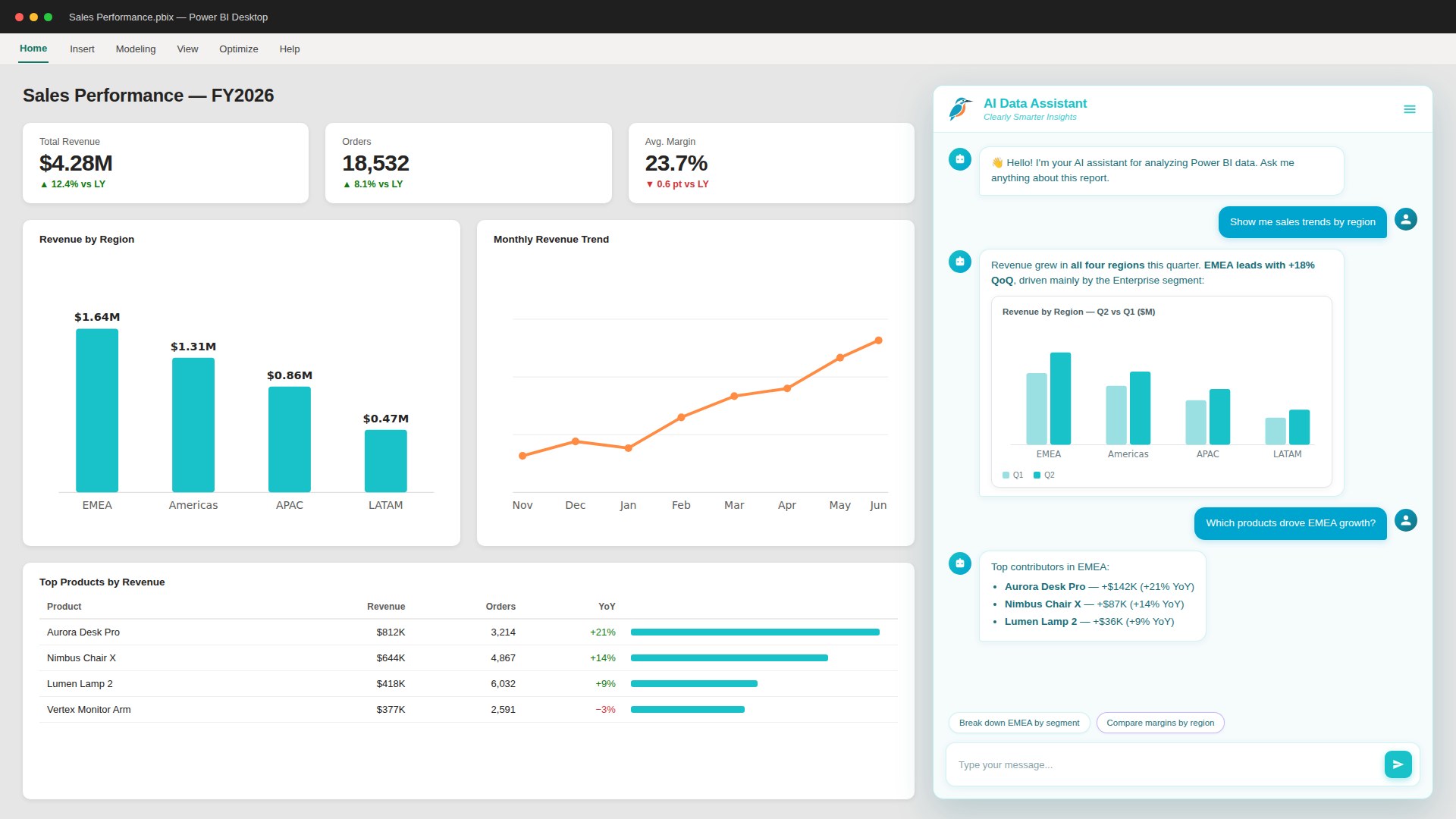
    AI Chatbot in Power BI showing conversational AI generating sales trends chart
    Pl. V  ·  AI Chatbot  ·  Helios Manufacturinginside a Power BI report

    What makes AI Chatbot different

    1. 01

      Conversational AI for Power BI

      Ask questions in plain language and get precise answers instantly.

    2. 02

      Hybrid AI Engine

      Combines AI and local processing for smarter results, faster performance, and lower API costs.

    3. 03

      Instant Data Insights

      Discover patterns and anomalies without writing a single measure or DAX code.

    Features

    Powerful Features

    Everything you need for conversational analytics in Power BI

    1. 01

      Automatic Chart Generation

      Instantly creates column, line, pie, bar and area charts based on your query.

    2. 02

      Intelligent Hybrid Data Engine

      Combines local data processing with AI for faster, cheaper, more accurate results.

    3. 03

      Formatted Results

      Returns answers as tables, bullet lists or charts - perfectly formatted for presentation.

    4. 04

      Built-in DAX Assistant

      Generates complete DAX measures from a single sentence, using your model's real columns.

    5. 05

      Export to PDF by Email

      Send a conversation, or an AI summary of it, as a PDF to the recipients set in the format pane. Professional and Enterprise.

    6. 06

      Instant Insights - No Code Needed

      Get interpretations and recommendations without writing any formula.

    7. 07

      4 Original Themes

      Choose from four professionally designed themes matching Power BI style.

    8. 08

      Full Design Customization

      Adjust colors, avatars and layout to fit your report's look and feel.

    9. 09

      Multi-Language Support

      Understands queries and responds in multiple languages (including Czech, Spanish, French, German).

    Some features vary by plan tier. See pricing for details.

    Demo

    From question to insight in seconds.

    Pl. VI  ·  AI Chatbot  ·  a conversation, start to chart
    Pricing

    Simple and scalable pricing

    New: every free licence starts with 30 days of Professional. No card, nothing to cancel. Get your licence

    Monthly
    Annual
    Save 20%

    Starter

    $12/month
    750 queries/month
    AI DAX Generator
    No watermark
    All 4 themes
    Custom avatars
    Recommended

    Professional

    $29/month
    2,000 queries/month
    Everything in Starter +
    Smart visualizations
    Insight Discovery
    Export & share via email

    Enterprise

    $149/month
    15,000 queries/month
    Everything in Pro +
    100 saved conversations
    Priority email support

    Feature comparison

    Hover over a feature to learn more

    Feature
    $0FREE
    $12/moSTARTER
    Popular$29/moPRO
    $149/moENTERPRISE
    Usage Limits
    1007502,00015,000
    LimitedUnlimitedUnlimitedUnlimited
    31030100
    102050100
    Customization
    AI Features
    Get Free License

    Try AI Chatbot for Free

    Generate your free license key in seconds - no credit card required. The first 30 days include everything in Professional; after that it stays free.

    FAQ

    Frequently Asked Questions

    AI Chatbot is a custom visual you add to a report page. Drag the columns and measures you want to ask about into the Data and Values wells, enter your SmartVisuals license key in the format pane, and ask questions in plain language. It answers with text, tables and, on Professional and Enterprise, charts, all worked out from the fields in the visual.

    Add any columns or measures to Data and Values; both wells accept categories and numbers. The visual only sees the fields placed in these two wells, not the rest of your model, so add everything a question might need. It loads rows in pages of 30,000 and keeps fetching until the table is complete, up to about 1.5 million rows.

    No. With a license key the chat runs on SmartVisuals AI (included), so a report works without an AI account of your own. If you prefer your own account, choose OpenAI, Anthropic, Google, xAI or Azure OpenAI under AI Provider in the format pane and paste your key; the provider then bills you directly. Questions count toward your plan's monthly messages either way.

    Every plan starts with a license key. The free license includes 100 messages a month, conversational AI, custom prompts and the SmartVisuals theme, with a small SmartVisuals line under the chat. Starter (750 messages) adds the DAX Assistant, all themes and custom avatars, and removes that line. Professional (2,000 messages) adds charts, Insight Discovery and sending a conversation as a PDF by email. Enterprise (15,000 messages) adds 100 saved conversations and priority email support. Instant Insights, computed on your device without AI, is free in every plan once you switch it on. When the month's messages run out, the chat answers with a kingfisher fact instead of an analysis until the next month or an upgrade.

    On Starter and above, turn on DAX Assistant in the visual's menu and describe what you want to calculate in plain language. The assistant writes a complete DAX measure using the real names of the columns you added to the visual. Copy it into a new measure in Power BI Desktop and adjust it if needed.

    The visual computes totals, rankings, filters and comparisons locally from the rows in the visual. It then sends the AI your question, the column names, a few sample values and those computed results, rather than the whole table, and the AI writes the answer. This keeps answers tied to your numbers, responses faster and API costs lower.

    The interface is available in English, Czech, German, French and Spanish (Language > Interface Language in the format pane). You can ask questions in any language; the answer follows the language of your question, or the language you set in Chat Language.

    Yes. Choose the SmartVisuals, Modern, Terminal or Dark theme, or Blank, where you set colours, fonts, message spacing and corner radius yourself. You can also rename the chatbot and set the avatars. The free license uses the SmartVisuals theme; Starter and above unlock all themes and custom avatars.

    To answer a question, the visual sends the question, column names, a few sample values and the results it computed locally to an AI service. With SmartVisuals AI (included), this goes through the SmartVisuals relay to OpenAI using our key; the relay records the token count for your license, not the content. With your own OpenAI, xAI or Azure OpenAI key, it goes directly from your browser to that provider. With your own Anthropic or Google key, it passes through the SmartVisuals relay, which forwards it and does not store it. Your API keys stay in the report's settings. Conversation content is stored on our servers only if you keep Save Conversation History on or send a PDF export. See our Privacy Policy for full details.

    Save Conversation History is on by default: conversations are stored on SmartVisuals servers, tied to your license key, so you can reopen them from the visual's menu. Each plan keeps a set number of conversations (3 on the free license, 10 on Starter, 30 on Professional, 100 on Enterprise). Switch the setting off under Chatbot Behavior in the format pane and conversations stay only in the current session.

    Yes! One license key works in any number of reports and workspaces - just enter it in the visual's settings wherever you use it. All reports share the license's monthly query quota, so if you need more capacity, upgrade your plan or buy a message pack.

    Use the Report a bug block on the Support page, or write to hello@smartvisuals.io. Tell us the visual version, what you asked and what you expected; a screenshot helps. Every message reaches the person who builds the visual.
    Missing something?

    Tell us what is missing.

    A feature you need, a bug you hit, a visual that does not exist yet. Every message reaches the person who builds these visuals, and feature requests shape what ships next. We also build visuals to order.