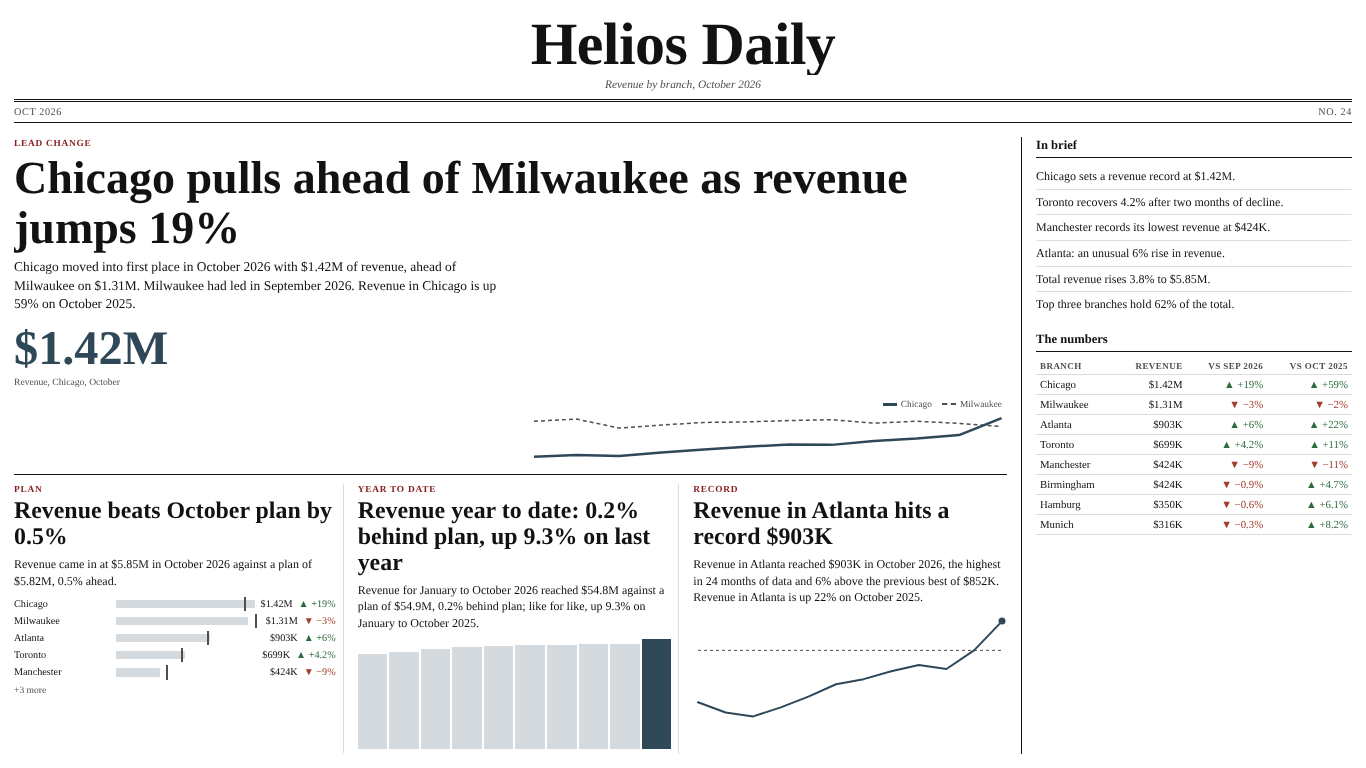
Automatic headlines in Power BI: writing the monthly review from the data, honestly
Every monthly review starts with the same few sentences. Who is on top, who moved, how the total did. Someone types them into a text box on the first page, and next month someone forgets to change one of them. A sentence that is wrong does more damage than a chart that is wrong, because people read sentences without checking them.
Power BI can write those sentences for you. A text measure, a card or a smart narrative and some DAX will do it. The DAX is not hard. What takes care is the set of rules that keep a generated sentence from saying something the data does not. This article builds the measures and goes through the rules, with a branch network as the example: Chicago, Milwaukee, Atlanta, Toronto, Manchester, Birmingham, Hamburg and Munich, revenue by month.
The model
Three tables are enough: a Sales fact table with one row per branch and month, a Branch dimension and a marked Date table related to the month column of Sales. The branch dimension matters more than it looks. The measures below iterate over branches, and if they iterate over VALUES ( Sales[Branch] ) instead, a branch that has no rows this month disappears from the list, and so does the comparison with last month.
Revenue = SUM ( Sales[Revenue] )

Revenue PM =
CALCULATE ( [Revenue], DATEADD ( 'Date'[Date], -1, MONTH ) )
Put a month slicer on the page, or filter the visual to the edition month. Everything below is evaluated in that month.
A change that respects blanks and zero bases
The obvious change measure is DIVIDE ( [Revenue] - [Revenue PM], [Revenue PM] ). It has two problems. A branch that did not report this month gets a change of minus 100%, and a branch whose last month was zero or negative gets a percentage that means nothing.
Revenue Change % =
VAR Cur = [Revenue]
VAR Prev = [Revenue PM]
RETURN
    IF ( NOT ISBLANK ( Cur ) && Prev > 0, DIVIDE ( Cur - Prev, Prev ) )
A blank Prev compares as zero in DAX, so Prev > 0 also rules out a missing last month. The rule behind it is the first one worth writing down: a blank is not a zero. A branch with no figure gets no story, not a collapse.
A total that compares like for like
"Total revenue rises 3.8%" sounds simple. But if Toronto opened in October, the total rises because there is one more branch, not because anyone sold more. If Hamburg's October figures are not loaded yet, the total falls for the same kind of reason. Compare the branches that report in both months:
Revenue LFL =
SUMX (
    VALUES ( Branch[Branch] ),
    VAR Cur = [Revenue]
    VAR Prev = [Revenue PM]
    RETURN IF ( NOT ISBLANK ( Cur ) && NOT ISBLANK ( Prev ), Cur )
)

Revenue PM LFL =
SUMX (
    VALUES ( Branch[Branch] ),
    VAR Cur = [Revenue]
    VAR Prev = [Revenue PM]
    RETURN IF ( NOT ISBLANK ( Cur ) && NOT ISBLANK ( Prev ), Prev )
)
Inside SUMX each measure reference is evaluated for one branch at a time. The headline uses the change between these two, and when the like-for-like total is not the whole total, the sentence should say so ("across seven branches with figures for both months").
This only works for a measure that adds up. An average order value or a margin percentage has no meaningful sum across branches, and adding them produces a number nobody can interpret. For those, write about the branches, not the total.
A leader that admits a tie
The leader is the branch with the highest revenue. Two branches can share that value, and a tie should be said, not settled by sort order.
Leader =
VAR Ranked =
    FILTER (
        ADDCOLUMNS ( VALUES ( Branch[Branch] ), "@Rev", [Revenue] ),
        NOT ISBLANK ( [@Rev] )
    )
VAR TopRev = MAXX ( Ranked, [@Rev] )
VAR Tops = FILTER ( Ranked, [@Rev] = TopRev )
RETURN
    IF (
        COUNTROWS ( Tops ) > 1,
        "Level: " & CONCATENATEX ( Tops, Branch[Branch], " and " ),
        CONCATENATEX ( Tops, Branch[Branch] )
    )
The NOT ISBLANK filter matters: in DAX a blank equals zero, so without it a month where the top value is zero would list every silent branch as a joint leader. Leader PM is the same measure with [Revenue PM] in place of [Revenue].
Now the lead headline can tell a change of leader from a leader that stayed:
Lead Headline =
VAR NowLeader = [Leader]
VAR WasLeader = [Leader PM]
RETURN
    SWITCH (
        TRUE (),
        LEFT ( NowLeader, 6 ) = "Level:", NowLeader & " at the top",
        LEFT ( WasLeader, 6 ) = "Level:", NowLeader & " moves clear at the top",
        WasLeader <> "" && NowLeader <> WasLeader,
            NowLeader & " takes the lead from " & WasLeader,
        NowLeader & " stays on top"
    )
A lead that is technically a lead but tiny is still news of a sort. If the gap between first and second is under one percent of the leader's value, "a close race" is more honest than "leads".
Words that match the size of the change
A sentence also carries a verb, and the verb carries a size. "Revenue soars" for a 1.2% rise is the kind of line that makes a reader stop trusting the page. Tie the verb to thresholds and keep a floor below which nothing is reported:
Change Verb =
VAR p = [Revenue Change %]
RETURN
    SWITCH (
        TRUE (),
        ISBLANK ( p ), BLANK (),
        ABS ( p ) < 0.02, "holds steady",
        p >= 0.25, "soars",
        p >= 0.10, "jumps",
        p >= 0.03, "rises",
        p > 0, "edges up",
        p <= -0.25, "plunges",
        p <= -0.10, "drops",
        p <= -0.03, "falls",
        "slips"
    )
Two percent as the floor is a choice, not a law; set it to what your business calls noise. Format the number the way people read it: whole percentages from 10%, one decimal below, so a 4.2% rise does not round to 4% while a 19% jump does not need "19.0%".
Change Text =
VAR p = [Revenue Change %]
RETURN
    IF ( NOT ISBLANK ( p ), IF ( ABS ( p ) < 0.1, FORMAT ( ABS ( p ), "0.0%" ), FORMAT ( ABS ( p ), "0%" ) ) )
The rules that keep generated copy true
The measures above handle the mechanics. These rules are what decide whether the sentences can be trusted. They apply whatever tool writes them.
Report, never explain. "Chicago pulls ahead of Milwaukee" is in the data. "Chicago pulls ahead thanks to the new contract" is not, and the reader cannot tell which half of the sentence was computed. Keep words like because, due to and thanks to out of every template.
Lower is sometimes better. For operating costs, defects, downtime or days to close, a fall is good news. A template that says "Milwaukee leads" on a cost table, or colours a falling cost red, says the opposite of what happened. Decide the direction per measure; for a cost table, the top branch has "the highest operating costs".
Percentages change in points. A margin going from 10.0% to 10.3% has risen 0.3 points. Calling it a 3% rise is arithmetically correct and practically misleading. The same goes for averages: never sum them across branches.
Records and streaks need history. "Atlanta hits a record" after three months of data is a claim about three months. Ask for a minimum history before the word record appears (six periods is a reasonable floor) and at least three moves in a row before streak.
A half-loaded month is not news. On the second working day of the month, half the branches have reported. Every total falls and the page announces a collapse. Pick the latest month in which most branches have figures, or show last month until the current one is complete.
Say how it was written. Next to each generated sentence, or in its tooltip, show the rule that produced it and the numbers it compared. It costs one more measure and saves the meeting where someone asks where the 19% came from.
When the text box is not enough
The measures here produce one sentence each. A monthly review needs a few: the lead, the movers, the total, a line about concentration. Each story type adds a measure, each needs its own exceptions, and choosing which story leads the page is a ranking problem of its own.
That is what we built SmartVisuals Newspaper for. Bind a Category, a Measure and a Period and it finds the stories, ranks them and lays them out as a front page with headlines, decks, small charts and a numbers table. The rules above are built in: blanks are not zeros, totals are like for like, ties are called level, costs and percentages read the right way round, and every story's tooltip ends with "How this was written". Everything is written from templates inside the visual, with no network calls, in English, Spanish, Portuguese or German.
The front page is free: rank changes, the leader and the lead margin, the biggest rise and fall, the total and the share of the top three, every layout and Boardroom mode. Editor's desk, the premium layer at $2.99 per user per month or $29 per user per year, adds records, streaks, unusual moves, plan, last year, year to date and one front page per business unit; it previews in edit mode, and readers without a licence see the full free page. The visual has been prepared for Microsoft Marketplace and is not published there yet.
If you stay with DAX, the checklist is short: a branch dimension to iterate, a change measure that skips blanks and zero bases, a like-for-like total, a leader that admits a tie, verbs tied to thresholds, and no sentence that claims a reason the data does not contain.
Try AI Chatbot for Free
Experience the power of conversational analytics in your Power BI reports. Get your free license in seconds - no credit card required.
Get Free License