
Visuals/Pl. XXXIII

    Newspaper

    Your data, written up as a front page

    Bind a category, a measure and a month. The visual finds the stories, ranks them like an editor and prints headlines, decks and small charts, offline.

    Read the documentationComing soon to Microsoft Marketplace
    Datasheet
    Status
    Coming soon to Microsoft Marketplace
    Price
    $2.99 /user/mo · $29 /user/yr
    Licensing
    Per user, assigned in the Microsoft 365 admin center. Unlicensed viewers see the free tier, never a blocked visual.
    Data
    Computed inside Power BI. No external calls, no API keys, no telemetry.
    Visuals API
    5.11
    Accessibility
    Single-tab-stop keyboard navigation, screen-reader labels on every story and chart, a real table for The Numbers, rise and fall arrows, high contrast, reduced motion, minimum text size
    Languages
    Format pane in 20 languages; headlines in English, Spanish, Portuguese and German
    Data
    Up to 30,000 category and period rows, with a status note when the cap is reached
    Network
    No external calls, no privileges requested; headlines are written from templates inside the visual
    Works in
    Power BI Desktop, Service, Embedded
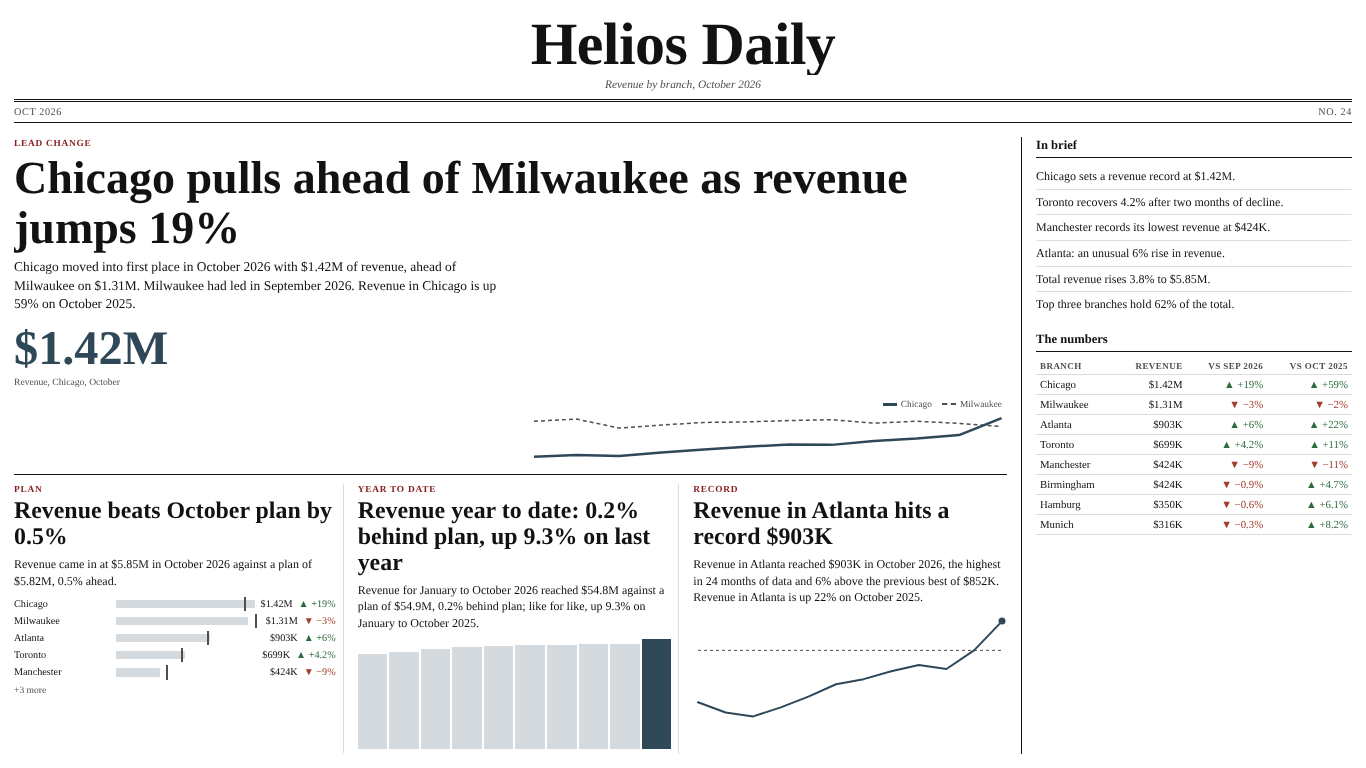
    Helios Daily front page in Power BI: Chicago pulls ahead of Milwaukee as revenue jumps 19%, with plan, year-to-date and record stories and a numbers table
    Pl. XXXIII  ·  Newspaper  ·  The monthly review: plan, year to date, last month and last year, written up as a front page (Editor's desk, Clean theme).rendered from the shipped visual
    What it does

    SmartVisuals Newspaper reads the numbers bound to it and writes the front page: Chicago pulls ahead of Milwaukee, Manchester falls 9%, total revenue rises 3.8% to $5.85M. A lead story with headline, deck, figure and chart, columns of stories, an In brief column and The Numbers table, laid out for the size of the tile.

    Every word comes from deterministic templates inside the visual. There is no AI service and no network call, nothing leaves the report, and the same data always gives the same page. The free front page is complete on its own; Editor's desk, the premium monthly review, adds records, unusual moves, plan, last year, year to date and one page per business unit.

    Search all visuals

    Free and premium

    Where the line is, exactly.

    Report authors see the full premium set in edit mode, so you can evaluate every feature on your own data before assigning a single licence. Unlicensed viewers always get a working chart.

    Free tierevery viewer
    • The front pageLead change, leader and lead margin, biggest rise and fall, total and the share of the top three, ranked into a lead, columns, In brief and The Numbers.
    • Headlines in four languagesHeadlines in English, Spanish, Portuguese and German, picked from the report language or set in Stories > Headline Language; the format pane comes in 20 languages.
    • Measures read the right way roundLower is better for costs, a measure type for averages and percentages, Leave Out for categories such as a test branch, fx bar colours and dynamic format strings.
    • Layouts that fit the tileBroadsheet, tabloid and digest, picked by tile size, and Boardroom mode with bars, a trend chart and plain bullet points.
    • Your paperFour themes (SmartVisuals, Dark, Clean and Slate) and your own masthead title and tagline with tokens such as {period} and {measure}.
    • Tooltips, cross-filter, keyboardHover a story for its numbers and "How this was written"; click or press Enter to cross-filter by its category; cross-highlight, context menu and high contrast.
    Premium$2.99 /user/mo · first month free
    • Records, streaks, comebacks and unusual movesA record needs six periods of history, a streak three; an unusual move prints the usual range it broke.
    • Plan, last year and year to datePlan stories from a Target, last year next to last month, and year to date against plan and last year.
    • EditionsEdition By prints one front page per business unit or country, with a pager.
    • More measures, your own headlines, a pinned leadStories on up to two more measures, headline templates per story type, lead headline and deck templates, and a category pinned to the lead.
    • Special editionsVintage (letterpress) and Evening Edition (the late final) papers for the newspaper style.

    How do I turn a measure into a front page in Power BI?

    Bind a Category (branch, region, product or team), a Measure and a Period, and SmartVisuals Newspaper writes the page itself: a masthead, a lead story with headline, deck, big figure and chart, columns of stories with small charts, an In brief column and The Numbers table. With Chicago, Milwaukee and Atlanta on Category, Revenue on Measure and a month on Period, the October page opens with "Chicago pulls ahead of Milwaukee as revenue jumps 19%".

    No DAX for each headline and no text boxes to keep up to date. The masthead defaults to "{measure} Daily" and accepts your own title and tagline with tokens such as {period}, {measure} and {categoryNoun}, so "Helios Daily" stays correct when the month changes.


    Which stories does it find, and how does it pick the lead?

    The free front page looks for rank changes (who pulled ahead of whom), the leader and the lead margin, the biggest rise and the biggest fall, the total and the share of the top three, each against the previous period. Every story gets a score, the highest becomes the lead, and the next ones fill the columns, skipping a category that already has a story; the rest go to In brief.

    The choice is deterministic: there is no randomness and no clock, so the same data always gives the same page. Headlines vary their wording by story type, category and period, and the verb follows the size of the change: edges up, rises, jumps, soars; slips, falls, drops, plunges. Below Stories > Smallest Change Worth Reporting (%), 2% by default, a value holds steady.

    Does the copy stay honest about costs, averages and percentages?

    Yes. It reports what the numbers did and never says why: no causal word appears in any template, in any of the four headline languages. Stories > Which Way Is Better reads "lower is better" from names such as Operating Costs, Defects or Downtime, so a cost that falls is good news in the words and in the colours, and a cost table has "the highest", never a "leader". Stories > Measure Type keeps averages and ratios from being summed and writes percentage changes in points (10.0% to 10.3% "rises 0.3 pts").

    A blank is not a zero: a category without a value in a period gets no story for it. There is no percentage change on a zero or negative base, the total is compared like for like over the categories that report in both periods, equal values are called level and a lead under 1% is a close race. In Editor's desk, a record needs at least six periods of history and a streak at least three. Hover any story and the tooltip ends with "How this was written": the rule that fired and the numbers it compared.

    What does Editor's desk add for the monthly review?

    Editor's desk is the premium layer. It adds records, streaks and comebacks, and unusual moves: a change outside the usual range of the category's own last twelve changes, with that range printed and last year's seasonal pattern taken into account. Bind a Target for plan stories, set Edition > Compare With to Previous Period and Last Year to add the change on the same period a year earlier, and switch on Year-to-Date Story for the year so far against plan and last year.

    Up to two More Measures get their own stories ("Chicago leads revenue, Atlanta leads margin"). Edition By prints one front page per business unit or country, with a pager. Headline Templates set your own wording per story type, Pin to the Lead puts a chosen category on top, and the Vintage and Evening Edition special editions change the whole paper.

    What data does it expect?

    One row per category and period with a numeric measure. The Period can be a date (months, quarters and years are recognised and labelled Oct 2026, Q4 2026 or 2026), a year number or a text label, which keeps the model's sort order. Without a Period the page still shows the leader and the share of the top three. Edition > Edition Period on Auto skips a half-loaded latest period, so a month where only some branches have reported does not become the front page.

    Up to 30,000 category and period rows reach the visual, for example 500 categories over 60 months. When the cap is hit, a status line says that some categories or periods may be missing; the page is never written from a silently partial set. Rows without a category or a period are left out and counted in the same status line.

    Front page, Boardroom or a narrow tile: which layout?

    Edition > Layout on Auto picks a broadsheet for a full page, a tabloid for half a page and a single-column digest for narrow tiles and phones. When text does not fit, whole stories drop from the end, In brief first, then The Numbers, so nothing is cut mid-word. Edition > Style > Boardroom shows the same facts as a plain report: bars by category with change labels, a trend chart and the decks as bullet points.


    Four themes come free (SmartVisuals, Dark, Clean and Slate), with a custom masthead, fonts, paper colour and fx bar colours. Honest limits: one category level, headlines in English, Spanish, Portuguese and German only, no explanation of causes, and images only as data: URIs, never fetched from a web address.

    Use cases

    Where Newspaper earns its place.

    The monthly sales front page for a branch network

    A sales director binds Branch to Category, Revenue to Measure and the month to Period. The page opens on the month's real news, such as "Chicago pulls ahead of Milwaukee as revenue jumps 19%", with the total, the biggest rise and fall and the share of the top three below it, and The Numbers table listing every branch with its change. Clicking a story cross-filters the rest of the report to that branch.

    A cost desk that reads costs the right way round

    A controller binds Operating Costs by branch and month and gives the paper its own name in Masthead > Title. Stories > Which Way Is Better reads lower is better from the name, so a branch whose costs fall is worded and coloured as good news, and the top of the table is "the highest operating costs", not a leader. Averages such as Avg Order Value are never summed, and Margin % changes in points.

    The plan review for the management meeting (Editor's desk)

    Bind Plan to Target, set Edition > Compare With to Previous Period and Last Year and switch on Plan Stories, Records, Unusual Moves and Year-to-Date Story. The page reports the total against plan, the branches furthest ahead of and behind plan, year to date against plan and last year, and records such as "Revenue in Atlanta hits a record $903K", each with last year's change in the deck.

    One front page per business unit (Editor's desk)

    Bind Region to Edition By and each region, such as Americas and Europe, gets its own front page, total and Numbers table, as if the report were filtered to it. The pager in the edition line, or Page Up and Page Down on a story, turns the page, and Editions > Open on Edition sets which region opens first and appears in exports.

    Getting started

    From empty canvas to first chart.

    1. 01

      Bind a field such as Branch to Category and a measure such as Revenue to Measure.

    2. 02

      Bind a date or month column to Period for rank changes, movers and the total against the previous period.

    3. 03

      Set Stories > Which Way Is Better and Measure Type if Auto guessed wrong, and list any category to skip in Leave Out (Comma-Separated).

    4. 04

      Give the paper a name in Masthead > Title, pick a theme and a layout, or switch Edition > Style to Boardroom.

    5. 05

      Optionally bind a Target, More Measures or Edition By and switch on the Editor's Desk stories; they preview free in edit mode.

    Get Newspaper

    On its way.

    Installation instructions for both paths are on the download page.

    Microsoft Marketplace (recommended)

    The offer is prepared for Microsoft Marketplace and not published yet. This page will link to the listing the moment it is live.

    Coming soon
    Accessibility

    Readable and usable for everyone.

    Tab
    Moves into the front page, which is one tab stop: the focused story. With Editions, the Previous edition and Next edition buttons are further tab stops.
    Arrow keys
    Right or Down moves to the next story in reading order (lead, stories, briefs); Left or Up to the previous one.
    Home / End
    Jumps to the first or the last story.
    Enter or Space
    Selects the focused story's category and cross-filters the page. Hold Ctrl to add it to the selection.
    Esc
    Clears the selection.
    Shift+F10 or the context-menu key
    Opens the Power BI context menu for the focused story.
    Page Up / Page Down
    With Edition By bound (Editor's desk), turns to the previous or next edition.
    • Screen readers

      The page is a region named after the masthead. Each story is an article with a heading and reads its kicker, headline and deck in one label, and whether it is selected. Every chart is an image with a label that says what it shows, such as "Revenue by branch, October 2026"; In brief and The Numbers are labelled sections, and The Numbers is a real table with header cells. The edition pager is a labelled navigation whose edition name is announced politely when it changes, and the status line is a status region.

    • Not colour alone

      Rises and falls carry ▲ and ▼ arrows next to the figures (Accessibility > Arrows for Rise and Fall, on by default and always on in high contrast), and every change is also written in the headline and deck.

    • High contrast

      In Windows high contrast mode the paper, text, rules, bars and arrows use the contrast theme's background and foreground colours, the accent uses its selection colour, paper textures and special editions are dropped, fx bar colours are ignored and the arrows are always shown.

    • Reduced motion

      On a data update the page fades in story by story. Accessibility > Reduce Motion turns this off, and so does the operating system's reduced-motion setting; there is no motion on formatting changes or in exports.

    • Focus outline

      Accessibility > Focus Outline Color (Empty = Theme) and Focus Outline Width (1 to 6 px, 2 by default) set the keyboard focus ring on stories and pager buttons.

    • Minimum text size

      Accessibility > Minimum Text Size (6 to 24 px, 9 by default) is a floor for every computed text size, so fitting a page to a small tile never shrinks text below it; whole stories drop instead.

    • Context menu

      Right-clicking a story opens the Power BI context menu for its category; right-clicking the paper opens it for the visual. Shift+F10 does the same from the keyboard.

    • Languages

      The format pane and the visual's own labels come in 20 languages: Chinese (Simplified and Traditional), Czech, Danish, Dutch, English, French, German, Hungarian, Italian, Japanese, Korean, Norwegian, Polish, Portuguese (Brazil and Portugal), Slovak, Spanish, Swedish and Turkish. Headlines are written in English, Spanish, Portuguese or German.

    Questions

    Asked before you did.

    More questions? See support or write to hello@smartvisuals.io.

    The front page is free: rank changes, the leader and lead margin, biggest rise and fall, total and top-three share, all layouts and Boardroom mode, four themes, four headline languages, fx bar colours, dynamic format strings, tooltips, cross-filter and keyboard access. Premium, Editor's desk, adds records, streaks and comebacks, unusual moves, plan stories, last year as a second comparison, year to date, Editions, stories on two more measures, headline templates, a pinned lead and the Vintage and Evening Edition papers, for $2.99 per user per month or $29 per user per year, with the first month free.

    The visual has been prepared for Microsoft Marketplace and is not published yet; this page will link to the listing once it is live. Licences will be per user, bought on Microsoft Marketplace and assigned in the Microsoft 365 admin center, with no licence key and no account on this website.

    The full free front page. Each premium setting falls back to its free equivalent and the page fills with free stories, so no hole is left; Power BI shows its own short licence notice. The visual never blocks a report and never shows a watermark. In edit mode every premium feature previews in full.

    No and no. The visual requests no privileges and makes no network calls; every headline is written from deterministic templates inside the visual, so the same data always gives the same page. Images are shown only from data: URIs in the Image field; web addresses are never fetched.

    Category and Measure are required; Period adds rank changes, movers and the total against the previous period. Image takes a logo per category as a data: URI and Tooltips takes up to five extra values. The premium fields are Target (plan), More Measures (up to two) and Edition By (one front page per value).

    Up to 30,000 category and period rows, for example 500 categories over 60 months. When the cap is reached a status line says that some categories or periods may be missing. The page shows a lead and up to four stories below it (Edition > Stories Below the Lead, three by default); bar charts show the top categories and a "+N more" line, and Boardroom draws up to 15 bars.

    Because the data does not say why. The visual reports what the numbers did, never a cause: no template, in any headline language, contains a causal word, and every story's tooltip ends with "How this was written", the rule that fired and the numbers it compared.

    Yes. Stories > Which Way Is Better guesses lower is better from names such as Costs, Defects or Downtime, or you set it; a falling cost is then worded and coloured as good news. Stories > Measure Type keeps averages and ratios from being summed (no total, no share) and writes percentage changes in points. Both are free.

    Records, streaks and comebacks are Editor's desk stories: switch them on under Editor's Desk. A record also needs at least six periods of history and a streak at least three rises or falls in a row that add up to at least the Smallest Change Worth Reporting. Readers without a licence see the free stories instead.

    Yes. The page is one tab stop: the arrow keys, Home and End move between stories, Enter or Space cross-filters by the story's category, Esc clears and Shift+F10 or the context-menu key opens the context menu; with Editions, Page Up and Page Down turn the page. Stories are articles with headings and a full spoken label, charts have descriptive labels, The Numbers is a real table, rises and falls carry arrows as well as colour, and Windows high contrast and reduced motion are supported.

    Headlines, decks and chart labels are written in English, Spanish, Portuguese or German, following the report language or Stories > Headline Language; other report languages get English headlines. The format pane and the visual's own labels come in 20 languages: Chinese (Simplified and Traditional), Czech, Danish, Dutch, English, French, German, Hungarian, Italian, Japanese, Korean, Norwegian, Polish, Portuguese (Brazil and Portugal), Slovak, Spanish, Swedish and Turkish.

    Post it on the public board at smartvisuals.io/feedback, where other users can vote and comment, or use the Report a bug block on the support page (smartvisuals.io/support) or email hello@smartvisuals.io. A screenshot, the fields you bound and the "How this was written" line of the story in question help most.
    Troubleshooting

    When it does not look right.

    Found a bug or missing something? Post it on the requests board or vote for what others asked; the developer answers within two business days.

    The visual only shows "Add a Category and a Measure".
    Both Category and Measure must be bound before a page is written. If they are bound and the visual says "No stories for the current filters", the measure has no numeric values for any category in the filtered data: check the filters and that the field in Measure is a number, not text.
    There are no rank changes, movers or total stories.
    Those stories compare the edition period with the one before it, so they need a field in Period. Without one, the page shows the leader and the share of the top three. Also check the switches under Stories (Rank Changes, Biggest Rise and Fall, Total) and Smallest Change Worth Reporting (%): changes below it, 2% by default, are reported as holding steady.
    The front page shows last month instead of the current one.
    Edition > Edition Period on Auto skips a latest period in which fewer than half as many categories report as in the period before it, so a half-loaded month does not lead the page. Set it to Latest to always use the newest period, or Previous for the one before it.
    Falling costs are reported as bad news, or a percentage is added up.
    Set Stories > Which Way Is Better to Lower Is Better when Auto did not recognise the measure name as a cost, and Stories > Measure Type to Average or Ratio or Percentage (Changes in Points) when the measure does not add up. The tooltip's "How this was written" line says how the measure was read.
    Records, streaks or plan stories show in Desktop but not for report readers.
    They are Editor's desk features. Everything previews in edit mode; in reading view a reader without a licence sees the full free front page, the page fills with free stories and Power BI shows its licence notice. Assign the reader a licence in the Microsoft 365 admin center once the visual is published. A record also needs six periods of history and a streak three.
    A note says only the first 30,000 rows reached the visual.
    The visual reads up to 30,000 category and period rows and says so when the cap is reached, because some categories or periods may be missing. Filter the page to fewer periods or categories, or use a coarser Period such as months instead of days.
    For developers & AI agents

    Add this visual programmatically.

    Use the GUID and data roles below to add Newspaper to a Power BI report via PBIR or the Report Authoring agent. Full catalog (JSON)

    GUID available after the visual is published on Microsoft Marketplace.

    RoleDisplay nameKind
    categoryCategoryGrouping
    periodPeriodGrouping
    editionByEdition By ★Grouping
    measureMeasureMeasure
    secondaryMore Measures ★Measure
    targetTarget ★Measure
    imageImageGrouping
    tooltipsTooltipsMeasure
    Missing something?

    Tell us what is missing.

    A feature you need, a bug you hit, a visual that does not exist yet. Every message reaches the person who builds these visuals, and feature requests shape what ships next. We also build visuals to order.

    Also in the family