Visuals/Pl. XXVIII

    Split-Flap Board

    The departure board your data already has

    Bind a table and it flips in, character by character, like a 1970s station board. It pages itself on the wall screen, lights a lamp beside every status and flips only what changed. Completely free.

    Datasheet
    Status
    Available on Microsoft Marketplace
    Price
    Free, no licence
    Licensing
    Nothing to assign. Every feature for every viewer.
    Data
    Computed inside Power BI. No external calls, no API keys, no telemetry.
    Visuals API
    5.11
    Accessibility
    Single-tab-stop keyboard navigation, screen-reader table, lamp shape per status, high contrast, reduced motion
    Languages
    English, Czech, German
    Works in
    Power BI Desktop, Service, Embedded
    Pl. XXVIII  ·  Split-Flap Board  ·  the product spotrecorded from the shipped visual
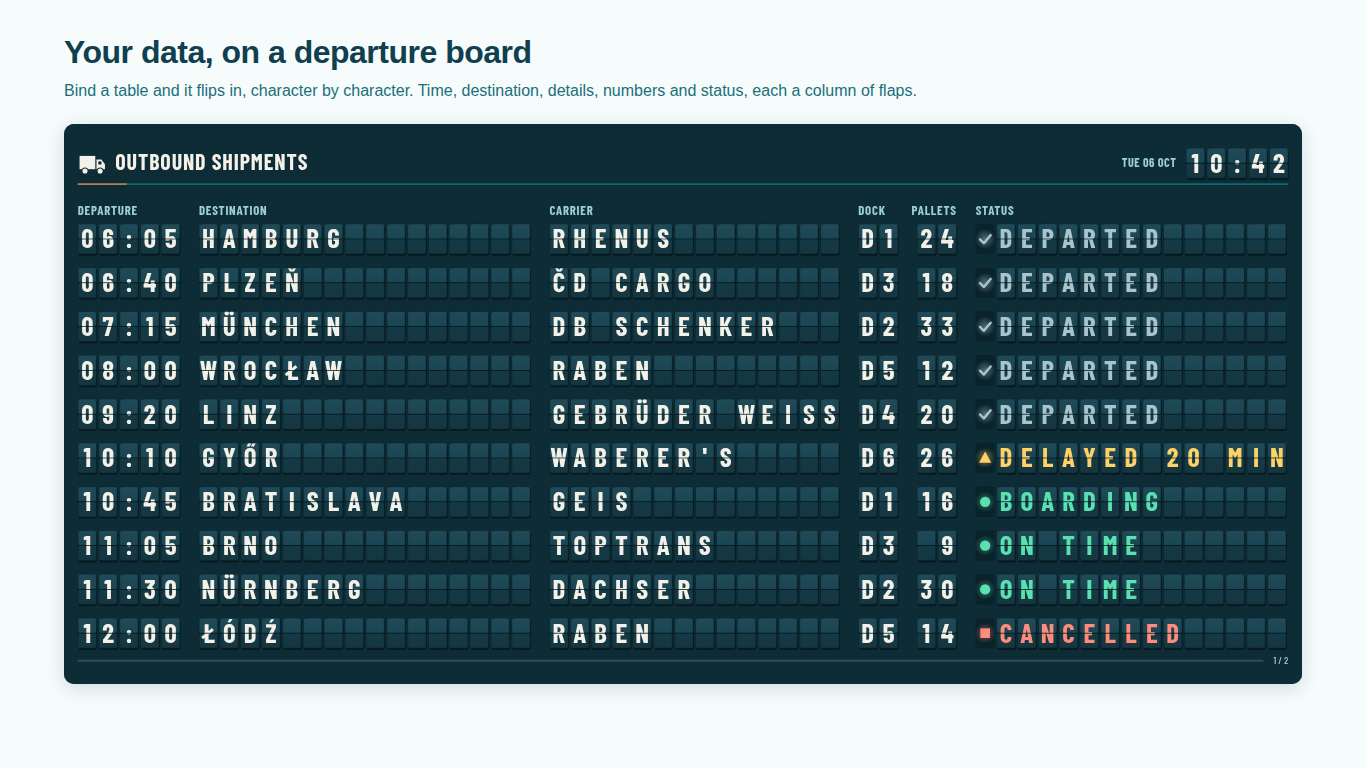
    Split-flap departure board in Power BI with time, destination, carrier, dock, pallets and status columns
    Pl. XXVIII  ·  Split-Flap Board  ·  Your data on a departure board: time, destination, carrier, dock, pallets and status as columns of flaps.rendered from the shipped visual
    What it does

    SmartVisuals Split-Flap Board turns a table in your model into a split-flap departure board. Every character sits on its own drum that only turns forward, so when the data refreshes, just the characters that moved flip and the board settles in a cascade. Time, destination, detail and number columns and a status column are each bound to a field and named after it in the format pane.

    It is made for wall screens: long lists page themselves, a live clock runs in the header, status words light lamps of their own shape and a DAX measure can drive the status. It is completely free, with no paid tier, no watermark and nothing locked, and it runs fully offline with no external calls.

    Search all visuals

    Everything in the box

    Every feature, for every viewer.

    No licence, no plan, nothing to assign. The whole visual is free and stays that way.

    Includedevery viewer
    • Real split-flap mechanicsPer-character drums that only turn forward, digit drums for times and numbers, and a cascade you choose: sweep, curtain, row by row, scattered or all at once.
    • Only what changed flipsA data refresh turns just the characters that moved; resizing or switching the theme never re-flips the board.
    • Status lamps and status measuresOn track, Watch, Problem and Done from editable word lists or a DAX measure with codes, ranges and thresholds, each with a lamp of its own shape.
    • Made for wall screensAuto-paging with page indicator and progress bar, a live clock in the viewer's zone, UTC or one of 20 cities, crisp at 4K and an OLED burn-in guard.
    • Three layouts and a boardroom tableDeparture board, word-wrapped message board and KPI tiles, plus a plain table style that shows the same data with no motion.
    • Four themes, every colour yoursTeal terminal, classic black airport board, gallery white and blue station board; {green}, {red} or {yellow} in the text makes a solid colour flap.
    • Built for real reportsCross-filtering, tooltips with every field, one keyboard tab stop, a screen-reader table, high contrast and reduced motion.

    How do I make a split-flap departure board in Power BI?

    Bind a table and it becomes a departure board: a time, a destination or item, up to six detail columns, up to six number columns and a status column, each bound to a field. The board flips in character by character, like the split-flap board in a 1970s station, and every column has its heading, width, alignment and visibility in the format pane, listed by the field's own name.

    Text is truncated the way a real board does it, with the whole value in the tooltip, but a number or time column is never cut short: it is always as wide as its longest value.

    Does the whole board flip again when the data refreshes?

    No. Only what changed flips. A data refresh turns just the characters that moved; resizing the visual or switching the theme repaints the board without re-flipping it. Every character sits on its own drum that only turns forward, so a change walks through the characters in between, and the board settles in a cascade you choose: sweep, curtain, row by row, scattered or all at once, at the speed you set.

    Time and number columns use digit drums, so a clock ticks in one flap the way the real modules were built. Accented letters such as Č, Ř, Ö, Ł and É are added right next to their base letter only when your data uses them, so an English board keeps the short ring and settles fast.

    Can the status come from a DAX measure?

    Yes. Status words become On track, Watch, Problem or Done from word lists you can edit, with English, Czech, German, French, Spanish and Polish built in. Or bind a measure to Status Measure: text such as Delayed goes through the word lists, and a numeric code goes through per-class code lists with exact codes, ranges such as 5 to 15 and comparisons such as greater than 30, printed as your own labels. A board follows your business rules without a calculated column.

    Status never depends on colour alone: the word stays on the board and each class lights a lamp of its own shape. Write {green}, {red} or {yellow} in the text for a solid colour flap.

    A table that pages itself on a TV

    Long lists page themselves, with a page indicator and a progress bar, and keep paging through automatic page refresh. Hovering or pressing P pauses; a mouse left resting on a wall screen stops pausing after 20 seconds, and Page Up and Page Down turn the page. The header carries a live clock and date in the viewer's time zone, UTC or one of 20 cities from London to Los Angeles, daylight saving included, in 24 or 12 hour format.

    The board is sharp on a 4K screen and readable on a small report tile, and an optional one-pixel drift protects OLED screens from burn-in. It is sound-free by design, so it is welcome in an open office.

    Departure board, message board, KPI tiles or a plain table

    Three layouts cover the wall screen: a departure board, a message board that word-wraps one message per page for a reception welcome screen, and KPI tiles with a big value and a status line. A plain table style shows the same data calmly, with no modules and no motion, for the boardroom.

    Four themes have their own character: a teal terminal, the classic black airport board, a gallery white board and a blue station board. Every colour of the board, flaps, lamps and labels can be changed, and shadows and the title rule switched off.

    Is a flip board accessible?

    The board is one keyboard tab stop with arrow keys, Home and End, Enter or Space to select and Escape to clear. A screen-reader table carries the current page, Windows high contrast uses the host palette, and viewers who ask their system for reduced motion get instant changes instead of flips. Colours pass WCAG contrast on every theme. Rows cross-filter the report with click, Ctrl+click and the standard right-click menu, and tooltips show every field of the row, on touch screens too.

    Use cases

    Where Split-Flap Board earns its place.

    Outbound trucks on a warehouse wall screen

    A logistics team maps the departure time to Time, the destination to Destination / Item, carrier and dock to Details, pallets to Numbers and the load status to Status. The board pages through the day's departures on the TV, lights a lamp beside every status, and on each refresh only the characters that changed flip, so a new dock number catches the eye.

    KPI tiles driven by a DAX status measure

    Switch Layout > Layout to KPI tiles and bind a measure that returns 1, 0, -1 or 2 to Status Measure. The codes map to On track, Watch, Problem and Done (Status > On Track Codes and the others take exact codes, ranges and comparisons) and print as your own labels, so the tiles follow your business rules without a calculated column.

    A welcome message at reception

    Layout > Layout > Message / headline word-wraps one message per page on the board, with Characters Per Line and Lines to size it. Visitors' names or the day's announcements flip in from a table in the model and page themselves.

    The same board for the boardroom

    Layout > Style > Plain table (boardroom mode) shows the same data as a calm table with no flaps and no motion, while the wall screen downstairs keeps the split-flap style.

    Getting started

    From empty canvas to first chart.

    1. 01

      Bind a time, a destination or item and the detail and number columns you need; the board flips in.

    2. 02

      Add a status column or a DAX measure to Status Measure for lamps of their own shape.

    3. 03

      Pick the layout and theme, and rename, size and align each column in the format pane by its field's name.

    4. 04

      Set rows per page, seconds per page and the header clock for the wall screen; everything is free.

    Get Split-Flap Board

    Two ways in.

    Installation instructions for both paths are on the download page.

    Microsoft Marketplace (recommended)

    Reviewed by Microsoft, updates automatically, licences assigned in the Microsoft 365 admin center.

    Open Microsoft Marketplace

    Direct download (1.0.0.0)

    .pbiviz package, import into Power BI Desktop or Service, does not auto-update.

    Download .pbiviz
    Accessibility

    Readable and usable for everyone.

    Tab
    Moves into the board. The whole board is one tab stop with a visible focus ring on the focused row.
    Up / Down arrow (or Left / Right)
    Moves to the previous or next row on the page.
    Home / End
    Jumps to the first or the last row on the page.
    Page Up / Page Down
    Shows the previous or next page.
    Enter or Space
    Selects the focused row and cross-filters the page. Hold Ctrl to add it to the selection.
    Esc
    Clears the selection.
    P
    Pauses or resumes automatic paging.
    • Screen readers

      The board is labelled with its title, the number of rows, the page ("Page 2 of 4") and a one-line keyboard help. A hidden table carries the rows of the current page with their column headings and is rebuilt whenever the page changes. Page changes and pausing are announced politely.

    • Not colour alone

      The status word stays on the board, and each status class lights a lamp of its own shape, so On track, Watch, Problem and Done read without colour.

    • Reduced motion

      When the operating system asks for reduced motion, every change appears at once instead of flipping. Layout > Style > Plain table (boardroom mode) shows the same data with no flaps and no motion for everyone.

    • Paging you can stop

      With Paging > Pause On Hover (on by default), hovering the board pauses automatic paging; a pointer that rests on a wall screen without moving stops pausing after 20 seconds. P pauses for keyboard users.

    • High contrast

      In Windows high contrast mode the board, flaps, text and lamps use the contrast theme's colours, shadows are dropped and the focus ring uses the selection colour.

    • Languages

      The format pane and every string drawn on the board are available in English, Czech and German.

    Release notes

    What changed, and when.

    Updates install automatically from Microsoft Marketplace. Full history.

    1. 1.0.0.0

      First release on Microsoft Marketplace.

      • A split-flap departure board, message board and KPI tiles where only the characters that changed flip on refresh.
      • Status lamps from words or a DAX status measure, auto-paging and a live clock for wall screens. Free.
    Questions

    Asked before you did.

    More questions? See support or write to hello@smartvisuals.io.

    Yes. Completely free: no paid tier, no licence check, no watermark and nothing locked, in edit mode, reading view or embedded.

    No. Only the characters that changed flip. Resizing the visual or switching the theme repaints the board without flipping it again.

    Yes. Bind a DAX measure to Status Measure. Text such as Delayed goes through the editable word lists; numeric codes, ranges and thresholds map to On track, Watch, Problem and Done and print as your own labels.

    When the operating system asks for reduced motion, every change is instant instead of a flip. The plain table style shows the same data with no motion at all.

    No. The board runs fully offline: no external calls, no telemetry, and the flap font is built in. The manifest declares no privileges.

    A Destination / Item field is enough to start. Time, up to six Details, up to six Numbers, a Status column or a Status Measure, Tooltips and a Row ID are optional. Until a field is mapped, the visual flips in a demo board and says which fields to add. The board shows up to 2,000 rows and raises a warning icon when the data has more.

    Layout > Layout offers a departure board, a message board that word-wraps one message per page, and KPI tiles with a big value and a status line. Layout > Style > Plain table (boardroom mode) shows any of them without flaps or motion. The board fills the tile: Rows Per Page 0 fills it, Tiles Per Page 0 picks the number of tiles, and flaps scale from a small card to a 4K wall screen.

    Yes. Paging > Page Automatically turns the pages every 10 seconds by default, with a page indicator. Hovering pauses it (Pause On Hover) until the pointer rests for 20 seconds, P pauses it from the keyboard, and Burn-In Guard shifts the board by one pixel for OLED screens. The header can show a live clock and date in the viewer's zone, UTC or one of 20 cities.

    Yes. The board is one tab stop: the arrow keys move between rows, Home and End jump to the first and last row on the page, Page Up and Page Down turn the page, Enter or Space selects (Ctrl adds), Esc clears and P pauses paging. A hidden table carries the current page for screen readers, page changes are announced, status never relies on colour alone, and Windows high contrast is supported.

    English, Czech and German, for the format pane and every string drawn on the board. Status words are recognised in English, Czech, German, French, Spanish and Polish.

    Post it on the public board at smartvisuals.io/feedback, where other users can vote and comment, or use the Report a bug block on the support page (smartvisuals.io/support) or email hello@smartvisuals.io. A screenshot and the fields you mapped help most.
    Troubleshooting

    When it does not look right.

    Found a bug or missing something? Post it on the requests board or vote for what others asked; the developer answers within two business days.

    The visual shows a demo board instead of my data.
    Before a field is mapped, the visual flips in a demo board and says which fields to add. Add a Destination / Item field first, then Time, Details, Numbers and Status as you need them.
    Text is cut off on the board.
    Like a real split-flap board, a text column shows as many characters as its width allows, and the tooltip has the whole value; numbers and times are never cut short. Widen the column in its group of the Columns card, lower Layout > Character Size (%), or show fewer columns.
    The status lamp stays dark or shows the wrong class.
    Status words are matched against the word lists in the Status card (On Track Words, Watch Words and so on), with common words in English, Czech, German, French, Spanish and Polish built in. Add your own words there. A numeric Status Measure goes through the code lists instead (1 = On track, 0 = Watch, -1 = Problem and 2 = Done by default).
    The board does not page, or it stops paging.
    Paging > Page Automatically pages only when the rows do not fit one page. With Pause On Hover, a pointer over the board pauses paging; once it rests without moving for 20 seconds, paging continues. P pauses and resumes from the keyboard, and Page Up / Page Down turn the page by hand.
    Nothing flips; changes appear at once.
    Either Flip Animation > Animate Flips is off, Layout > Style is Plain table, or the viewer's operating system asks for reduced motion, which the board honours by showing changes at once.
    A warning icon says not all rows are shown.
    The board shows up to 2,000 rows and says so when the data has more. Filter the page or the visual, for example to today's departures, to choose which rows appear.
    For developers & AI agents

    Add this visual programmatically.

    Use the GUID and data roles below to add Split-Flap Board to a Power BI report via PBIR or the Report Authoring agent. Full catalog (JSON)

    Visual GUID
    splitFlapBoardB7A58C9F7EBB4557ACA009E07D64B986
    RoleDisplay nameKind
    timeTimeGrouping
    primaryDestination / ItemGrouping
    detailsDetailsGrouping
    numbersNumbersMeasure
    statusStatusGrouping
    statusValueStatus MeasureMeasure
    tooltipsTooltipsMeasure
    rowIdRow IDGrouping
    Missing something?

    Tell us what is missing.

    A feature you need, a bug you hit, a visual that does not exist yet. Every message reaches the person who builds these visuals, and feature requests shape what ships next. We also build visuals to order.
    Also in the family