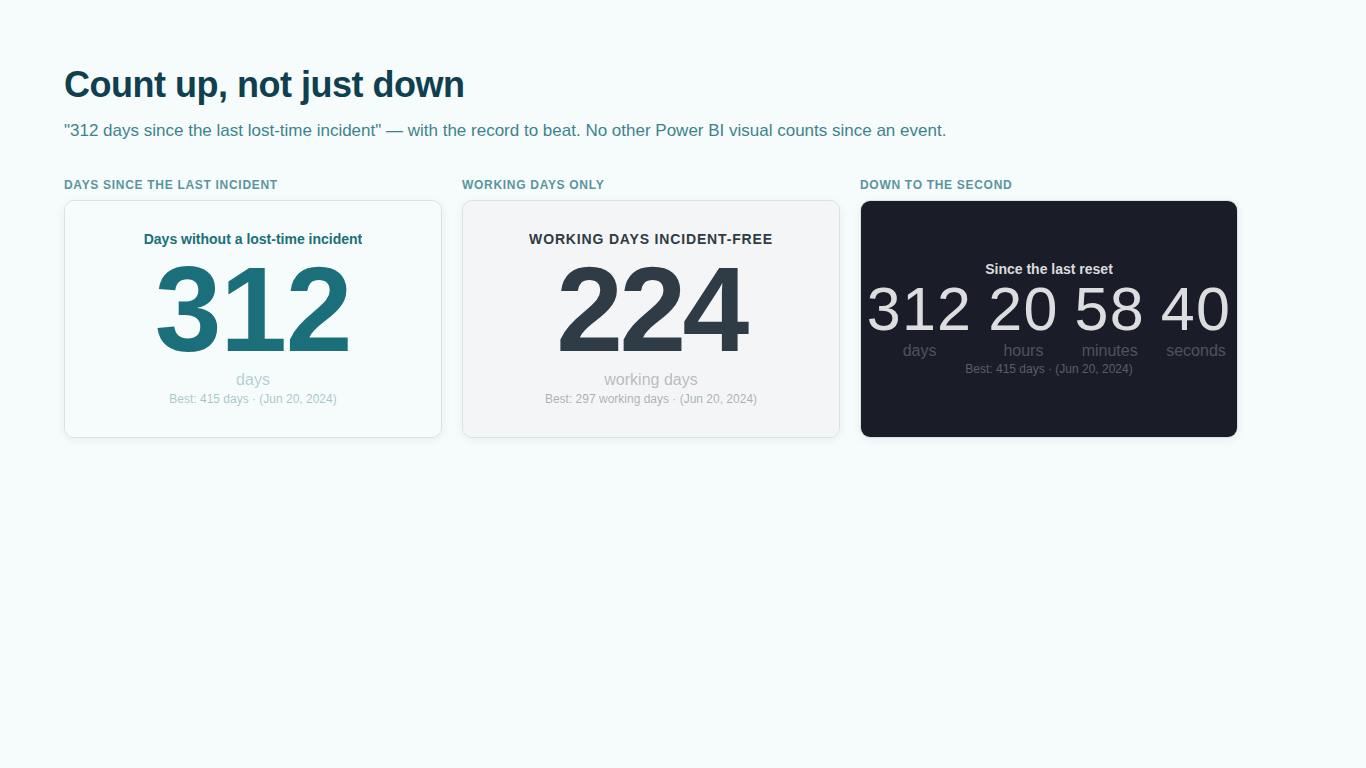
Days since last incident in Power BI: the DAX recipe, and why the card goes stale
"312 days without a lost-time incident" is one of the most requested numbers on a plant floor, and one of the simplest to get wrong in Power BI. The same is true of its mirror image, the countdown: days until a go-live, an audit or the end of the quarter. Power BI has no countdown or days-since visual of its own. Microsoft's free countdown timer visual was removed from the marketplace in September 2025, so many older forum answers now point to a page that no longer exists. What remains is the recipe everyone builds: a Card visual and a DAX measure with TODAY().
That recipe is short and mostly fine. It has two specific faults that show up only after the report is published, and they are worth understanding before the number goes on a wall screen.
The recipe
Assume a table SafetyEvents with one row per incident and a date column IncidentDate. The days since the last incident is the number of day boundaries between the most recent incident and today.
Days Since Last Incident =
VAR LastIncident = MAX ( SafetyEvents[IncidentDate] )
RETURN
    IF (
        NOT ISBLANK ( LastIncident ),
        DATEDIFF ( LastIncident, TODAY (), DAY )
    )
DATEDIFF with DAY counts midnights crossed, so the measure returns 0 on the day of the incident and 1 the day after. Decide whether that is the convention your safety team uses; some boards show day 1 on the incident day. MAX respects slicers, so a slicer on the plant gives each plant its own count. If the board should show the site-wide number whatever is selected, wrap the MAX in CALCULATE ( ..., REMOVEFILTERS ( SafetyEvents ) ).
The countdown is the same measure turned round:
Days To Go-Live =
DATEDIFF ( TODAY (), DATE ( 2026, 12, 1 ), DAY )
Put either measure on a Card and you are done on your own machine. The faults appear in the Service.
Fault one: the number does not move between refreshes
Where TODAY() is evaluated matters. In a calculated column or a calculated table it is evaluated once, at refresh, and stored. A column that says "days since" is frozen at the last refresh and will be a day behind by tomorrow morning if the model refreshes at 06:00.
In a measure, TODAY() is evaluated when the query runs, which sounds like the answer. But a report page does not re-run its queries on its own. A page left open on a screen in the canteen shows the number from the moment it was loaded until someone clicks a slicer, reopens the page or the model refreshes. Automatic page refresh would re-query on a timer, but it is available only for DirectQuery and some live-connection sources, not for the Import models most safety reports are built on. Dashboard tiles are cached as well.
For a whole-day counter this is often tolerable: the screen is a day behind until the overnight refresh catches it up. For anything with hours and minutes, a countdown to a launch or a service-level window, it is simply wrong for most of the day.
Fault two: the day ends at UTC midnight
In Power BI Desktop, TODAY() and NOW() use the clock and time zone of the computer running Desktop. In the Power BI Service they use UTC. The report that showed the right number on the author's laptop in Prague turns over at 01:00 or 02:00 local time once it is published. In Chicago the day changes at 18:00 or 19:00 the evening before, in the middle of the second shift. Somebody on the floor notices that the counter went up before midnight, and the counter loses its credibility.
The usual fix is to stop using TODAY() and build the local date from UTCNOW() and an offset. A fixed offset is one line, but it is wrong for half the year wherever daylight saving applies. For a plant in the European Union, where clocks change at 01:00 UTC on the last Sunday of March and of October, the full version looks like this:
Plant Now =
VAR UtcNow = UTCNOW ()
VAR Yr = YEAR ( UtcNow )
VAR MarchEnd = DATE ( Yr, 3, 31 )
VAR OctoberEnd = DATE ( Yr, 10, 31 )
VAR DstStart = MarchEnd - MOD ( WEEKDAY ( MarchEnd, 2 ), 7 ) + TIME ( 1, 0, 0 )
VAR DstEnd = OctoberEnd - MOD ( WEEKDAY ( OctoberEnd, 2 ), 7 ) + TIME ( 1, 0, 0 )
VAR OffsetHours = IF ( UtcNow >= DstStart && UtcNow < DstEnd, 2, 1 )
RETURN
    UtcNow + OffsetHours / 24

Plant Today =
VAR N = [Plant Now]
RETURN
    DATE ( YEAR ( N ), MONTH ( N ), DAY ( N ) )
WEEKDAY ( date, 2 ) numbers Monday as 1 and Sunday as 7, so MOD ( ..., 7 ) is the number of days back to the last Sunday on or before the 31st. The offsets 1 and 2 are Central European Time; change them for your zone, and replace the rule entirely for North America (second Sunday in March, first Sunday in November, at 02:00 local) or for a zone without daylight saving. Then swap TODAY() for [Plant Today] in the days-since measure:
Days Since Last Incident =
VAR LastIncident = MAX ( SafetyEvents[IncidentDate] )
RETURN
    IF (
        NOT ISBLANK ( LastIncident ),
        DATEDIFF ( LastIncident, [Plant Today], DAY )
    )
This assumes IncidentDate is already stored in plant local time. If the incident system exports UTC timestamps, convert those as well, or an incident logged at 23:30 local time lands on the next day.
One measure per plant zone is manageable for one site. A group report with plants in four countries needs a zone column on the plant table and a SWITCH over it, and every one of those rules is code that somebody has to keep right.
The record to beat
A days-since board usually shows a second number: the best streak on record. That is the longest gap between two consecutive incidents, or the current run if it is longer.
Best Streak (days) =
VAR Incidents = VALUES ( SafetyEvents[IncidentDate] )
VAR Gaps =
    ADDCOLUMNS (
        Incidents,
        "@Gap",
            VAR ThisDate = SafetyEvents[IncidentDate]
            VAR PrevDate =
                MAXX (
                    FILTER ( Incidents, SafetyEvents[IncidentDate] < ThisDate ),
                    SafetyEvents[IncidentDate]
                )
            RETURN
                IF ( NOT ISBLANK ( PrevDate ), DATEDIFF ( PrevDate, ThisDate, DAY ) )
    )
RETURN
    MAX ( MAXX ( Gaps, [@Gap] ), [Days Since Last Incident] )
It works on a few hundred incidents. Note that it inherits the same staleness as the current count, and with one incident in the table there is no completed gap, so the best streak is the current one. Show it that way rather than as "best: 0".
Pitfalls that are not about time
- The date column is text or a number. Exports from incident systems often carry dates as text, as Excel serial numbers or as Unix timestamps. Text does not behave as a date in
MAXorDATEDIFF, and a Unix timestamp read as a day number is nowhere near a real date. Set the column's data type in Power Query and spot-check a few rows. - Working days, not calendar days. "Working days incident-free" needs a calendar table with a working-day flag and holidays, and
COUNTROWSover it instead ofDATEDIFF. Three-shift plants sometimes count shifts instead of days, which DAX can do only with a shift table. - Blank when the filter has no incidents. A plant with no incidents in the table returns blank, not "days since the plant opened". Decide what the card should say and handle it in the
IF.
When a ticking visual is the better fix
Both faults have the same root: the number is computed by a query, and nothing re-runs the query between refreshes. The alternative is to compute the count in the browser from the viewer's clock, which is what a custom visual can do. It keeps ticking on a page that stays open all week, it can show hours, minutes and seconds, and it can resolve the day boundary in a named time zone with daylight saving handled for you.
That is why we built SmartVisuals Countdown & Days-Since, free on Microsoft Marketplace. Bind IncidentDate to Event dates and it shows the days since the last incident with the best streak and the date it was set. Set Deadline Time Zone to a named zone such as Europe/Prague and the day ends at the plant's midnight on any screen. Working days come from weekday toggles, a bound column of non-working dates and an optional business-hours window, with no calendar table to maintain. It makes no network calls.
It has a limit worth knowing: a browser clock is only as right as the device it runs on. If a wall screen's clock drifts, bind a measure such as Model Now = UTCNOW() to Reference time and the visual corrects a device clock that is running behind. If you stay with the Card, use UTCNOW() with an explicit offset rule instead of TODAY(), keep TODAY() out of calculated columns, and tell the people reading the screen when the number last refreshed.
Try AI Chatbot for Free
Experience the power of conversational analytics in your Power BI reports. Get your free license in seconds - no credit card required.
Get Free License