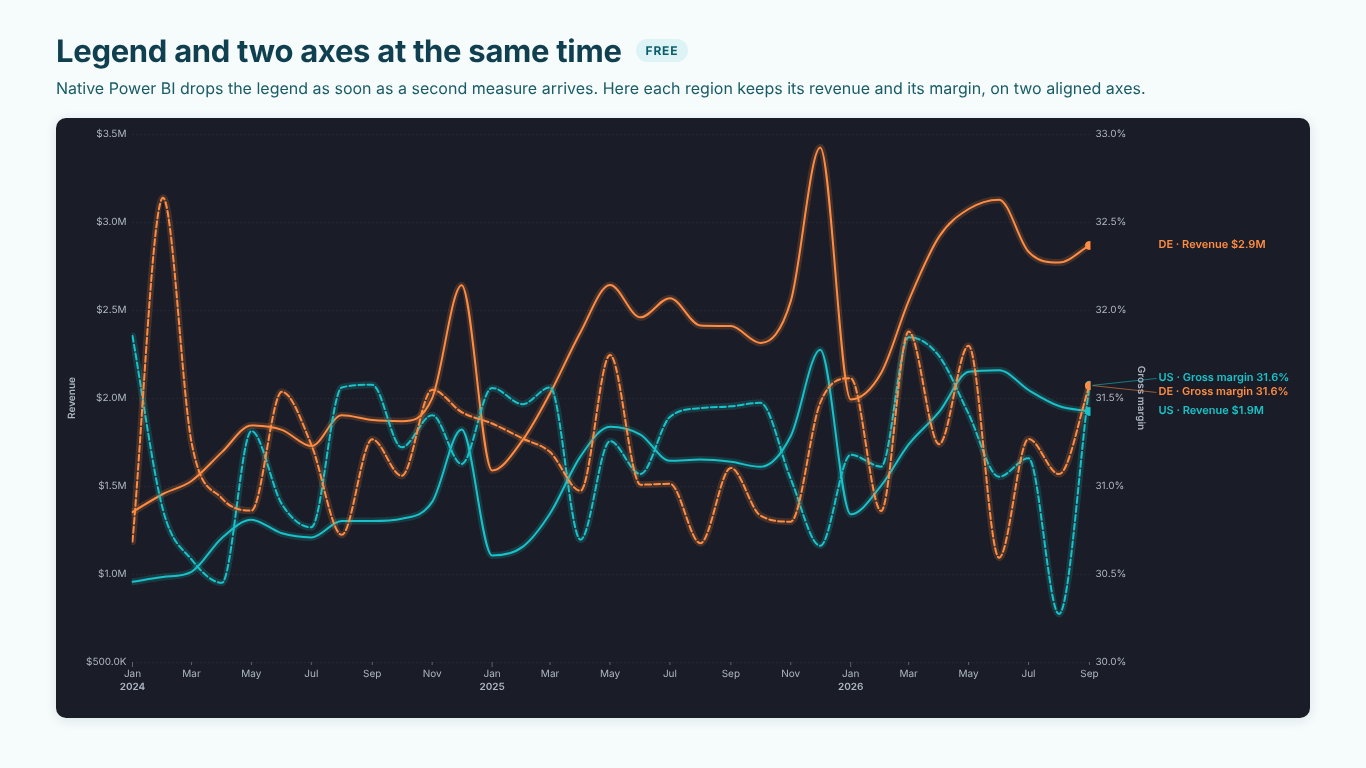
Line chart with a legend and a secondary axis in Power BI: the options, the DAX and when two axes mislead
The request comes up in almost every sales report: "Show me revenue and margin per region over time, on one chart." Two measures with different units (dollars and percent), one field that splits them into series (Region), and a date on the axis. In the built-in line chart those three do not combine: as soon as two measures sit on the Y-axis, the Legend no longer takes a field, and a single measure with a Legend gives you only one scale.
There are workable answers, each with a cost. This article goes through them, shows how to compute the margin so the lines are right in the first place, and ends with the part that matters whatever you build: when a second axis helps a reader and when it misleads them.
First, get the margin measure right
A margin line is only as good as its measure. The common mistake is averaging a percentage column: AVERAGE ( Sales[Margin %] ) gives every order the same weight, so a $50 order with 60 % margin counts as much as a $50,000 order at 20 %. The margin of a month or a region is total margin over total revenue:
Gross margin % =
DIVIDE (
    SUM ( Sales[Revenue] ) - SUM ( Sales[Cost] ),
    SUM ( Sales[Revenue] )
)
DIVIDE returns blank instead of an error when a region had no revenue in a month, which is what you want on a line: a gap, not a zero.
Put a date table on the axis (one row per day, marked as a date table, related to the sales date) and use its month. A month taken from the fact table only exists when something was sold, so a quiet month disappears from the axis instead of showing as a gap.
Option 1: one measure per region
The direct workaround is to drop the Legend and write the split into the measures:
Revenue US =
CALCULATE ( [Revenue], Region[Region] = "US" )

Gross margin % US =
CALCULATE ( [Gross margin %], Region[Region] = "US" )
Repeat for each region, put the revenue measures on the primary axis and the margin measures on the secondary one. It works, and every line is a measure you can format and colour individually.
The cost is maintenance. Four regions mean eight measures; a fifth region means two more, and a report that silently leaves it out until someone notices. Slicing by Region no longer works the way readers expect, because each measure has its region fixed inside it. Keep this option for a small, stable set of series, such as actual against plan for two business units.
Option 2: a field parameter to switch the measure
If the reader does not need both measures at the same moment, keep the Legend and let them choose the measure. Modeling > New parameter > Fields creates a field parameter from the measures you pick, here Revenue and Gross margin %. Put the parameter in a slicer and on the Y-axis, and Region in the Legend.
Now every region has its own line, slicing by Region works, and each view has one honest axis with one unit. The reader switches between "revenue by region" and "margin by region" instead of seeing both. For many questions that is the better chart: it asks one question at a time.
What it cannot show is the relationship between the two at the same time, such as "Germany grew revenue but gave up margin to do it".
Option 3: two charts on one time axis
The most honest version of "both at once" is two charts stacked on top of each other: revenue by region above, margin by region below, the same width and the same date range, so January sits at the same horizontal position in both. Each chart has one axis and one unit, and the eye moves vertically to compare the same month.
Make it easy to read:
- Use the same colour for a region in both charts, set by series in the format pane, so "orange is Germany" holds across the page.
- Fix the date range of both charts with the same slicer or filter, so their axes cannot drift apart.
- Give the lower chart less height; margin usually needs less vertical resolution than revenue.
The cost is space, and the fact that it is two visuals for one question.
When a second axis helps, and when it misleads
Whichever way you build a dual-axis chart, its scales are chosen independently. That is its use and its risk.
Crossings mean nothing. Where the margin line crosses the revenue line depends entirely on how each axis is scaled. Change the secondary axis from 0–40 % to 25–35 % and the lines cross somewhere else. Never write "margin overtook revenue in May"; it is a statement about the axis settings, not the business.
Slopes are not comparable either. A steep margin line next to a flat revenue line may be a two-point change on a narrow axis. Compare each line with itself over time, and read the values from its own axis.
Truncated axes exaggerate. An axis from 30 % to 33 % turns a three-point move into a line that runs from the bottom of the chart to the top. Sometimes three points matter a great deal, as with gross margin, and the zoom is right. Say so in the axis title or subtitle, so nobody reads it as a collapse.
Align the zeros when the series can cross zero. If profit and growth rates can be negative, two axes with their zeros at different heights draw a value above zero below the other axis's zero line. Start both axes at zero and align them, or the picture contradicts the numbers.
Make the pairing visible. Name each axis with its measure, tie each line to its axis (same colour as the axis labels, or a different dash for each measure), and label line ends with the series and measure, such as "US · Revenue". A reader should never have to guess which scale a line belongs to.
A useful test: cover the secondary axis with your hand. If the chart now suggests something false, the two axes are doing more work than the reader can check, and two stacked charts would be clearer.
Doing it in one visual
We built SmartVisuals Line Chart for exactly this chart. Put the date in Axis (date), Region in Legend, Revenue in Values and Gross margin % in Secondary axis values, and every region gets a revenue line on the left axis and a margin line on the right, labelled at the line ends as "US · Revenue" and "US · Gross margin". Series Line Styles sets a dash per series, so margin can stay dashed while revenue is solid, and Secondary Y-Axes > Colour Each Axis Like Its Series colours an axis like its line when it carries one series. Y-Axis > Start At Zero > Always together with Align Zero Across Axes puts both zeros at the same height. Format pane > Series Axes moves any single series to the other axis.
The same visual draws straight, smooth (without overshooting the data) or step lines, styles the line dashed after the last actual period, and computes everything inside the report with no external calls. See the landing page for what is free and what is premium. It has been prepared for Microsoft Marketplace and is not published there yet.
Whichever route you take, the checklist is the same: a margin measure computed from totals, a date table on the axis, one measure per scale or a clear pairing of each line with its axis, aligned zeros when values can be negative, and the "cover the axis" test before the chart goes out.
Try AI Chatbot for Free
Experience the power of conversational analytics in your Power BI reports. Get your free license in seconds - no credit card required.
Get Free License